Run the software factory in parallel
Last week I wrote about building a local software factory: a skill that takes every ticket through the same steps (verify, plan, build, review, QA, QA report, risk report), and a mod that shows which step a session is on.
That worked well for one ticket at a time. But a lot of my tickets turn into several pull requests once I plan them, and running those one after another meant a lot of waiting. So now, when the plan calls for more than one PR and they don't depend on each other, the factory gives each PR to its own agent and runs them at the same time.
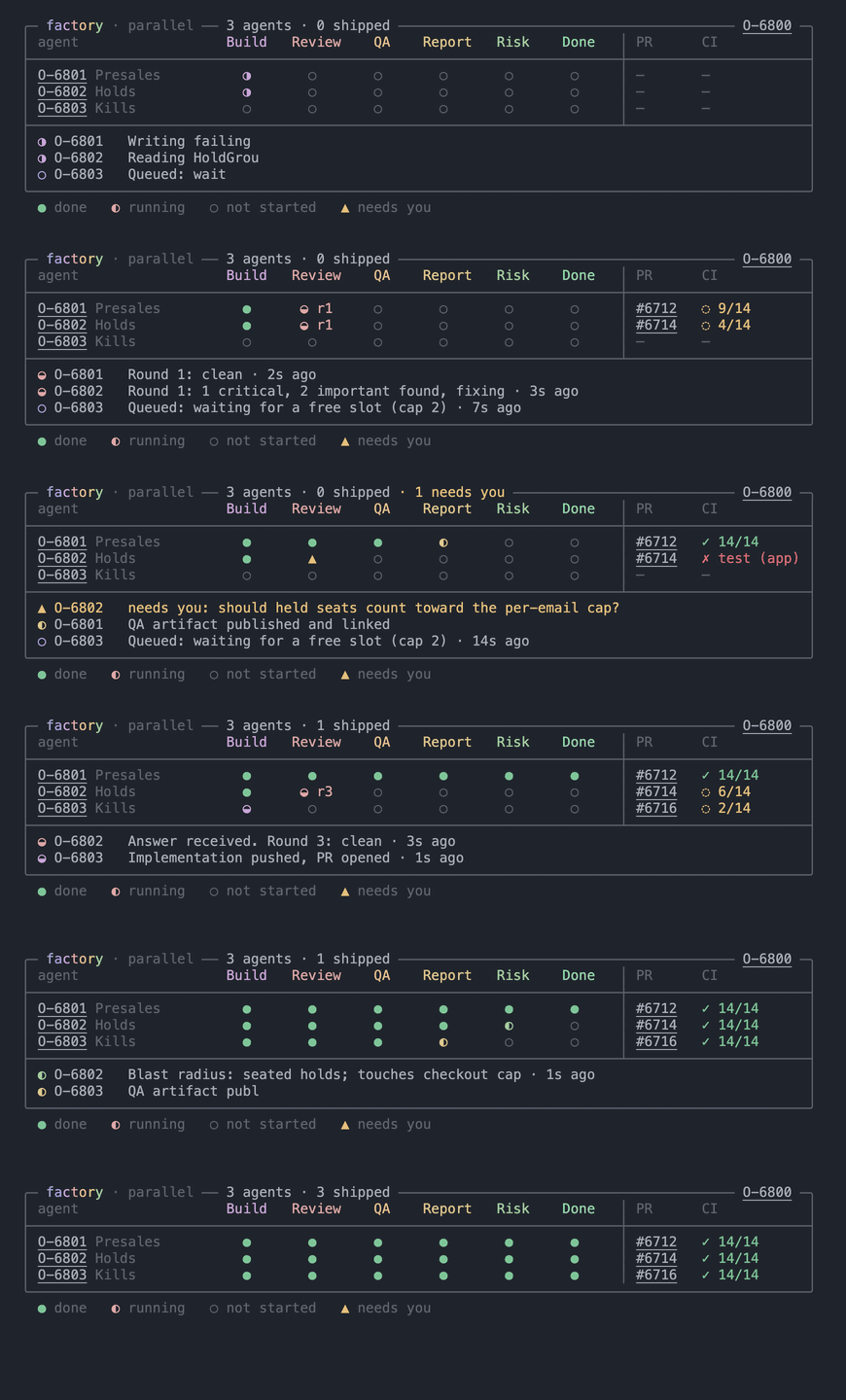
How it splits the work
I still do the first two steps once for the whole batch, in my main session. The ticket gets verified, I review one plan with a section for each PR, and I approve it once. Then the main session hands each PR to a background agent, and that agent takes it through build, review, QA, the QA report and the risk report on its own.
A few rules make this safe to run on one laptop:
- Two agents at a time. Every agent can boot Rails and a frontend build. The first time I tried running more, two of the runs were killed for memory and the third crashed the machine. Now the third PR waits in the queue until a slot opens.
- Locks for shared things. There's one Chrome and one development database. An agent takes a lock before it uses either one, and releases it when it's done.
- A collision table in the plan. Before anything starts, the plan lists every file that two PRs both touch, and the order I should merge them in.
- Questions come to me. When an agent gets stuck on a decision, it doesn't guess. Its row turns into a ▲ until I answer, and the main session passes my answer back to it.
The table
The old band was one row of steps for one ticket. The parallel view is a table instead: one row per agent and one column per step, with the PR and CI status on the right. Below the table, the rows that need me come first, then what each running agent is doing right now. Agents that have finished drop out of that list.
Verify and Plan aren't columns, because the main session finishes them before any agent starts. In a terminal the ticket and PR numbers are short labels you can click, so a row never wraps.
The prompt
If you built the factory from the last post, paste this into Claude Code to add parallel mode:
1Add a parallel mode to my /factory skill and its mod.2 3When the verified work splits into two or more pull requests that don't depend on each4other, run them in parallel:5 61. Verify and plan once, for the whole batch, in the main session. The plan has a section7 for each PR: what it builds, its branch, the files it expects to touch, and its tests.8 Add a collision table listing any file two PRs both touch, plus the order to merge them.9 I approve the batch once.102. Give each PR to its own background subagent, which runs build, review, QA, the QA11 report and the risk report for that PR alone. Run at most 2 at a time (raise this if your12 machine can handle more), and start the next one when a slot opens.133. Anything only one agent can use at a time (the browser, a shared dev database) needs a14 lock: take it with mkdir before using it, and remove it after.154. If an agent is blocked on a decision, it stops and reports why. The main session asks me,16 then passes my answer back to that agent.175. When every agent is done, give me one summary: each PR with its QA and risk reports,18 the collision table, and the order to merge.19 20In the mod, show a parallel batch as a boxed table above the prompt: one row per agent, one21column per step from Build to Done, then the PR and CI. Use one mark per cell: a filled22dot for done, a spinning dot for the step in progress, a hollow dot for not started, and a23triangle when the agent needs me. Under the table, list what needs me first, then a short24note from each running agent. Show links as short labels (O-1234, #567) that open when25clicked, so rows never wrap. Add a demo that plays three fake agents through the table.A few tips
- Start with two. Watch your memory during the first batch before you raise the limit.
- Read the collision table before you approve the plan. It's the cheapest moment to notice that two PRs will fight over the same file.
- Run the demo.
/factory-demo batchplays three fake agents, one of them stuck on a question, through the whole table in about thirty seconds.
Liked this? Get the next note by email.
about one a week · no spam · one-click out · or rss